
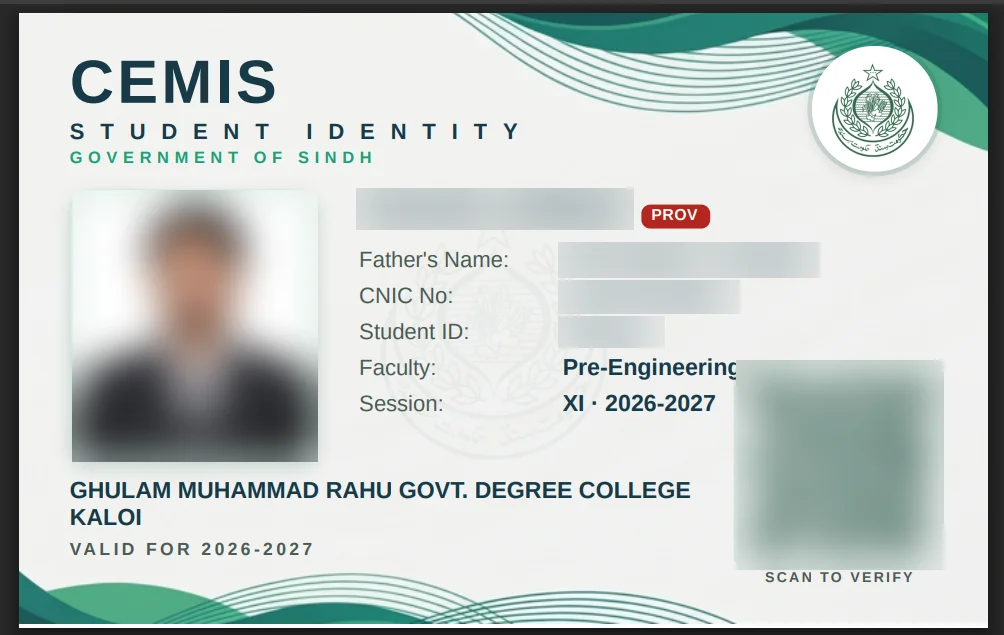
Your SECCAP ID card is the digital college ID you get after your admission is complete. You download it as a PDF from the official SECCAP student portal, with the same account you used to apply. We downloaded our own card on 22 October 2026, so this page shows the real screens: where the download button is, what is printed on the card, and how to check with the QR code whether a card is real or fake.
Quick answer: SECCAP ID card in 5 points
- Where: sign in to the official student portal at seccap.dgcs.gos.pk/login and open ID card in the left menu.
- Format: press Download ID card. You get a PDF with your photo and a verification QR code.
- Who can get it: students admitted to a government college through SECCAP. Our portal status showed Admitted when the card was available.
- Real or fake? Scan the QR code. A real card opens cemis.ced.gos.pk and shows “Authentic CEMIS document”.
- Problem on the card? Speak to your college office first, then the SECCAP help desk.
Sign in to download your ID cardOpens seccap.dgcs.gos.pk/login on the official portal
- Sign inWith the account you applied with
- ID cardOpen it from the left menu
- Download PDFPress Download ID card
- VerifyScan the QR code
How to download your SECCAP ID card (PDF)
You do not need to apply for the card separately. Once your admission is complete, it is linked to your SECCAP account.
- Sign in at seccap.dgcs.gos.pk/login with the account you used for the SECCAP form. Your username is your CNIC. Forgot your password? See our SECCAP login guide.
- Open ID card in the left menu of the student portal. The page says: Your official SECCAP student ID card, with a verification QR code and your photo. Download the PDF below.
- Press Download ID card. The card downloads as a PDF. Save it on your phone, and print it if your college asks for a printed copy.
- Check your details: your name, father’s name, faculty, session and college should match your admission.
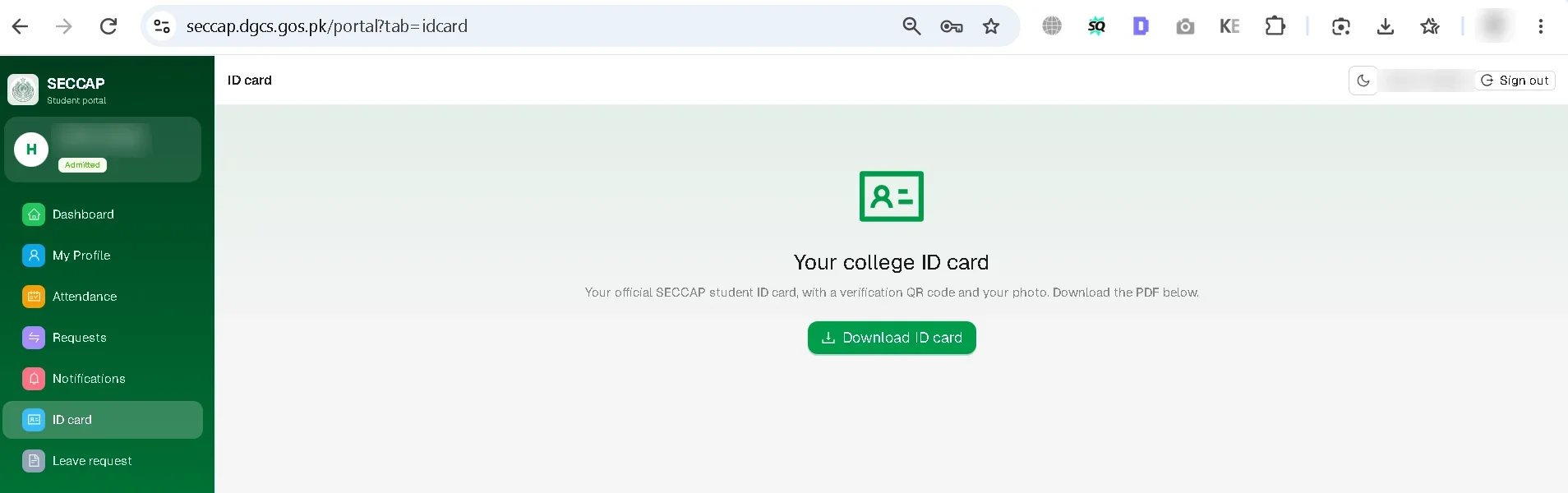
The same left menu also has Dashboard, My Profile, Attendance, Requests, Notifications and Leave request.
What is printed on the SECCAP ID card
The card is titled CEMIS Student Identity, Government of Sindh. CEMIS is the system of the College Education Department, Sindh. Our card shows:
- Your photo and full name
- Father’s name, CNIC or B-Form number, and Student ID
- Faculty (for example, Pre-Engineering) and session (XI · 2026-2027)
- Your college name and “Valid for 2026-2027”
- A QR code marked “Scan to verify”

Our card also has a red PROV label next to the name. It means provisional. Our admission form PDF explains it: Provisional admission — granted on your 9th (Class 9) result and subject to your Matric (SSC) result. Confirm your seat with the college after your Matric result is declared. Students admitted on Matric marks should not see this label.
How to check if a SECCAP ID card is real or fake
Every card has a QR code, and checking it is the SECCAP ID card online check (people also search it as the SECAP ID card check). Scan it with your phone camera and look at two things:
- The website address. It must be cemis.ced.gos.pk. The .gos.pk ending belongs to the Government of Sindh. Any other address means the card is not genuine.
- The result. A real card shows Authentic CEMIS document: This document was issued by CEMIS and its record is intact, with Student Digital ID Card: VALID, the student’s name, the college and the date it was issued.
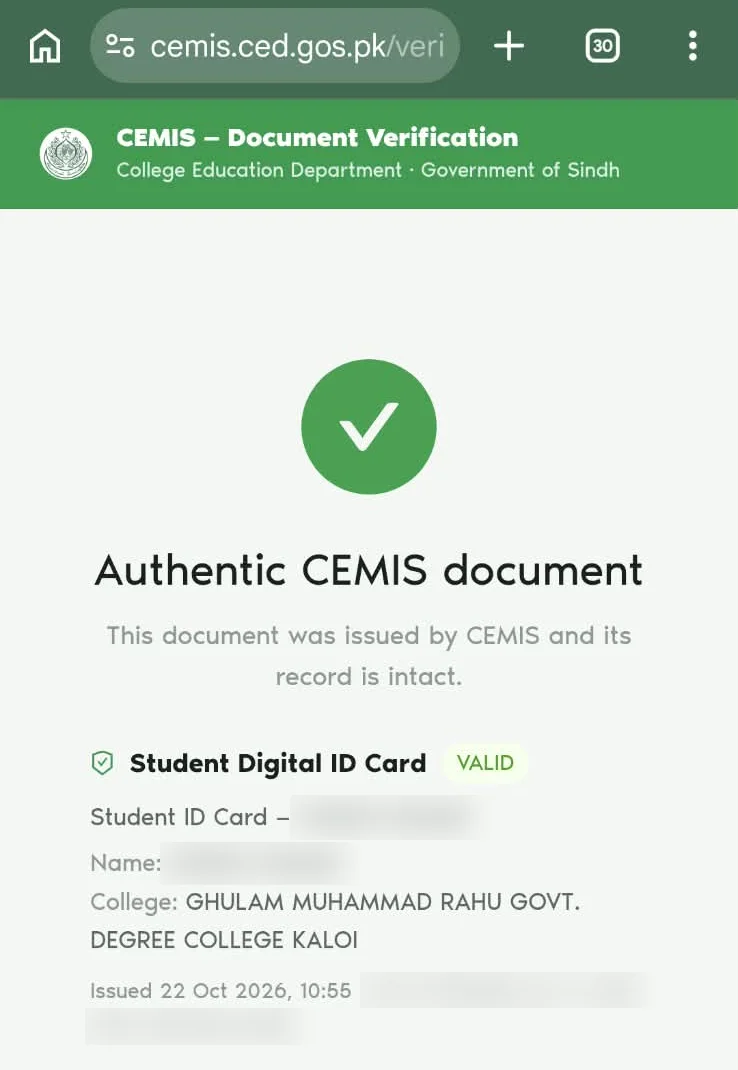
Check that the name and college on the verification page match the card in your hand. If they do not match, or the page says the card is not valid, the card has been changed or made by someone else.
Who can get a SECCAP ID card?
The digital college ID is for students who were admitted through SECCAP. You first need a college in a merit list (see our SECCAP result and merit list guide), and then your status must change to Admitted.
Your status is shown under your name in the portal. In our case it changed to Admitted and the ID card was ready to download without a visit to the college. Even so, the admission form PDF still says Please report at the college along with your required documents to confirm your admission, so go to the college with your documents anyway (see our SECCAP claim form guide). If your card does not appear yet, check your status first, then ask your college office.
SECCAP student card, online ID card and digital ID card: the same thing
Students search for this card under many names: SECCAP student card, SECCAP online ID card, SECCAP digital ID card, college digital ID card, CEMIS student ID, Sindh student card. They all mean the same card from the official student portal. There is no separate form to “apply online” for it.
First year and second year (2nd year) digital ID card
The card you get after admission is your first year (1st year) ID card: ours shows session XI · 2026-2027 and “Valid for 2026-2027”. Because the card is valid for one session, students in second year (Class XII) should sign in with the same account and open ID card first. If there is no card for the new session, ask your college office, because the college holds your record. We have not yet seen a second-year card ourselves, and will update this page when we do.
Is the SECCAP ID card the same as a board ID or CNIC?
| Card | Who issues it | What it is for |
|---|---|---|
| SECCAP digital college ID | CEMIS, College Education Department, Sindh, downloaded from the SECCAP student portal after admission | Your identity as a student of your government college |
| Board registration or admit card | Your intermediate board, such as BIEK in Karachi | Board enrollment and exams |
| CNIC or B-Form | NADRA | Your national identity |
SECCAP ID card and attendance
Attendance sits in the same left menu as ID card, but it is not working yet. On 22 October 2026 our portal showed: Student attendance — coming soon. This part of SECCAP connects to a service that is not live yet. It will activate automatically once the admissions backend is deployed. Your dashboard already shows an attendance figure (0% for us at the start) with a clear warning: Keep it above 75% to stay eligible for the board examination. Read more in our SECCAP online attendance guide.
If something is wrong on your ID card
| Problem | What to do first | If that does not work |
|---|---|---|
| Name spelled wrongly | Show your marksheet and CNIC or B-Form to your college office | Contact the SECCAP help desk |
| Wrong faculty or college | Check your merit list result; ask your college office | Contact the help desk with a screenshot |
| ID card not showing | Check that your portal status says Admitted | Ask your college office, then the help desk |
| QR code does not verify | Download the PDF again from the portal and scan the new copy | Ask your college office or the help desk |
| Cannot sign in | Use account recovery on the login page | See our login guide |
Help desk: WhatsApp or call 0345-2132045, Monday to Saturday, 9 am to 5 pm. More on our help desk page.
SECCAP ID card FAQs
How do I download my SECCAP ID card?
Sign in at seccap.dgcs.gos.pk/login, open ID card in the left menu and press Download ID card. It is available after your admission is complete.
Can I download the SECCAP ID card as a PDF?
Yes. The ID card page in the student portal gives you the card as a PDF, with your photo and a verification QR code. You can keep it on your phone or print it.
What is cemis.ced.gos.pk?
It is the College Education Department’s CEMIS website, the system behind the SECCAP digital ID card. When you scan the QR code on a real card, it opens a page on cemis.ced.gos.pk; on our own card it said “Authentic CEMIS document” and showed the Student Digital ID Card as VALID. You download the card from your SECCAP student portal, not from cemis.ced.gos.pk; the CEMIS page is only for checking a card.
How can I check if a SECCAP ID card is real?
Scan the QR code on the card. A real card opens cemis.ced.gos.pk and shows “Authentic CEMIS document” with “Student Digital ID Card: VALID”, plus the student’s name and college. Make sure they match the card.
When will I get my SECCAP digital ID card?
When the status under your name in the portal shows Admitted. In our case the card was ready without a college visit. If it is not there, ask your college office whether your admission is complete.
Do I need to apply for the SECCAP ID card?
No. There is no separate application. The digital college ID is linked to your SECCAP account once you are admitted.
Is the SECCAP student card the same as the digital ID card?
Yes. SECCAP student card, online ID card, digital ID card and CEMIS student ID are names for the same card from the official student portal.
How do I get a second year (2nd year) digital ID card?
Sign in with the same SECCAP account and open ID card. The first card is for session XI and is valid for one session, so if there is no card for second year, ask your college office first, since your record is held by the college.
How can I get my college ID card online?
If you were admitted to a government college in Sindh through SECCAP, your college ID card is online: sign in at seccap.dgcs.gos.pk/login, open ID card and download the PDF. Private colleges and colleges outside SECCAP issue their own cards, so ask your college office.
Is there a SECCAP admit card for 2026?
No. SECCAP is the admission system, so it gives you an admission form and, after confirmation, a college ID card. It does not issue an admit card. The admit card for your 1st year exams comes later from your intermediate board; in Karachi that is BIEK, after your BIEK enrollment and exam form.
What is the tracking number on the SECCAP ID card?
There isn’t one. Our ID card shows a Student ID, not the tracking number. The tracking number is the 12-character code the portal showed when you submitted your SECCAP form, and it is also printed on your admission form PDF. You do not need it to download the ID card: you log in to the student portal with your CNIC and password. See what the tracking number is and where to find it.
My name is wrong on the SECCAP ID card. What should I do?
Take your marksheet and CNIC or B-Form to your college office. If they cannot fix it, contact the official SECCAP help desk.
اردو میں خلاصہ
- داخلہ مکمل ہونے کے بعد پورٹل میں لاگ ان کریں، بائیں مینو سے ID card کھولیں اور Download ID card دبائیں۔ کارڈ پی ڈی ایف میں ملتا ہے۔
- اس کے لیے الگ سے درخواست دینے کی ضرورت نہیں، اسی اکاؤنٹ سے لاگ ان کریں جس سے فارم بھرا تھا۔
- کارڈ اصلی ہے یا جعلی، یہ جاننے کے لیے کیو آر کوڈ اسکین کریں۔ اصلی کارڈ cemis.ced.gos.pk پر کھلتا ہے اور VALID لکھا آتا ہے۔
- یہ فرسٹ ایئر کا کارڈ ہے۔ سیکنڈ ایئر میں بھی اسی اکاؤنٹ سے لاگ ان کریں؛ کارڈ نہ ملے تو کالج کے دفتر سے پوچھیں۔
- کارڈ پر غلطی ہو تو پہلے اپنے کالج کے دفتر سے رابطہ کریں۔
Sources and how we checked this guide
Every fact on this page comes from the official SECCAP portal, our own admission, or a named source. We downloaded and verified a real ID card on 22 October 2026.
- Our own ID card, 22 October 2026: the portal’s ID card page, the downloaded PDF and its QR verification on cemis.ced.gos.pk (screenshots with personal details blurred).
- Login page of the official SECCAP portal.
- Our portal’s Attendance section, 22 October 2026: marked “coming soon”.
- Required Documents: Sindh Bank challan for the admission fee.
This is an independent guide, not the official SECCAP website. If the portal says something different from this page, follow the portal and tell us so we can correct it.