

The SECCAP admission form is how you apply for 1st year (Class XI) admission to government colleges in Sindh, including Karachi. It is an online form, and you fill it only on the official website, seccap.dgcs.gos.pk. There is no blank paper form to buy or print. (Some people spell it the SECAP or SCCAP form; it is the same form.) I filled the SECCAP online form myself on 9 October 2026, so every step below has a real screenshot, with personal details blurred. Here is how to fill the SECCAP admission form online for 2026-27, step by step.
Quick answer: SECCAP admission form 2026 in 5 points
- What it is: the single online application for Class XI (first year) admission to government colleges across Sindh, run by the College Education Department, Government of Sindh.
- Where to apply: only on the official portal, seccap.dgcs.gos.pk/apply. No OTP, and no registration is needed first: your account is created when you submit. Registering first is optional.
- Fee: None. The form is free. You pay the college admission fee later, through a Sindh Bank challan from the portal.
- Status for 2026-27: applications are closed. On 14 November 2026 the official portal homepage said new applications are no longer accepted; forms already submitted continue through the selection rounds. (On 5 November it had shown 31 December 2026 as the last date.)
- Choices: you pick one faculty (group) and rank exactly five colleges for it. The form will not submit with fewer. Seats are given on merit, college by college, in the order you choose.
Fill the SECCAP admission form on the official portalOpens seccap.dgcs.gos.pk/apply on the official portal
- Fill the formBio-data, academics, photo and documents
- Rank collegesOne faculty, exactly five colleges
- SubmitSave your tracking number and password
- AllotmentChoice by choice, shown in Notifications
- Report to collegeThe Principal confirms your admission
SECCAP form 2026-27 at a glance
| Question | Answer |
|---|---|
| Who runs SECCAP? | College Education Department, Government of Sindh, through the Directorate General of Colleges Sindh (DGCS) |
| Official website | seccap.dgcs.gos.pk (apply at /apply, O-Level at /o-level) |
| Who is it for? | Students taking first year (Class XI, HSC Part-I) admission in Sindh government colleges |
| Application fee | None |
| Last date to apply (2026-27) | Closed (November 2026) |
| College choices | Exactly five, in order of preference, all for one faculty |
| Registration or OTP | Not needed. Your account (username = your CNIC) is created when you submit. Registering first is optional. |
| Tracking number | Shown when you save or submit the form. Keep it to track or resume your application |
| Paper form or PDF? | You fill it online only. After you submit, you can download your filled admission form as a PDF |
| Admission fee | Paid after a seat is allotted, through a Sindh Bank challan (official Required Documents page). Follow your college’s instructions |
| Help | WhatsApp or call 0345-2132045, Monday to Saturday, 9 am to 5 pm (listed on the portal) |
Who can apply for SECCAP admission 2026
Any student who has passed Matric (SSC), or is waiting for the result, can fill the SECCAP admission form for a government college in Sindh. The official Eligibility page lists these conditions:
- Matric passed between 2022 and 2026: SSC Part-II or an equivalent O-Level, as a regular or private candidate.
- Sindh domicile or PRC.
- Result not out yet: you can apply provisionally with your 9th-class marks. Your admission is confirmed or revised once the Matric result comes. If your Matric marks fall well below your 9th-class marks and drop under the cut-off, the provisional admission may be cancelled.
- Sindh boards: the portal accepts all six Sindh boards: Karachi (BSEK), Hyderabad, Mirpurkhas, Shaheed Benazirabad, Sukkur and Larkana. It also accepts AKU-EB, the Federal Board (FBISE), AJK and other provincial boards.
- O-Level and A-Level students can also apply. They use the O-Level apply page and need an IBCC equivalence certificate.
- Out-of-province or foreign boards: you need an IBCC equivalence certificate.
The portal also lists a maximum age of 18 (you must not be older than 18) and says the gap since Matric must not exceed five years for regular admission. If you are older or passed Matric a few years ago, check with the help desk on 0345-2132045 before you apply.
Who is not eligible
- Students who failed in more than two subjects in Class IX. The 2026-27 instructions on the form say they cannot apply online through SECCAP.
- Students who fail in more than two subjects in Matric. Their admission is cancelled for that academic year.
- Students who did not appear in the Matric examination.
- Students with a gap of more than five years since Matric.
- Students already enrolled in first year (H.Sc / F.Sc). They must first cancel that enrollment with their board and their SECCAP admission, then apply again.
These rules are shown on the first step of the form itself. Full rules are on the official Eligibility and Admission Policy pages of the portal.
Which colleges can you choose? The A+ and A grade rule
Your grade (your Class 9 grade if you apply on 9th-class marks, otherwise your Matric grade) decides how wide your college choice is. The official instructions on the portal say:
- A+ and A grade: you may choose any college.
- B, C, D and E grade: you apply to colleges in your own zone.
- Karachi: the College Zone System continues, so students get admission in their nearest colleges.
If you have a B grade or lower, pick your five colleges from your own area. Choosing colleges outside your zone can waste your choices.
Two rules that can stop your application
- Students who failed more than two subjects in Class IX cannot apply online through SECCAP for 2026-27.
- Candidates with a study gap of more than five years are not eligible for the 2026-27 session.
Do you need to create an account first?
No, there is no separate SECCAP online registration you must finish first. You can click Start your application and fill the six steps directly. Your account is created when you submit, and the portal shows your password and tracking number on screen, so note them down. You can also create an account first on the Register page and set your own password; the portal then signs you in and opens the same form. One CNIC can have only one account.
Minimum marks for each group
| Group (faculty) | Matric subjects you need | Minimum required |
|---|---|---|
| Pre-Medical | Science group with Biology | 70% |
| Pre-Engineering | Science group with Mathematics | 70% |
| Computer Science / IT | Science group | 60% |
| Commerce | Any group | No minimum |
| Humanities (Arts) | Any group | No minimum |
| Home Economics | Any group | Open merit, female students only |
These are the minimums to apply. Popular colleges close far above them. Check our SECCAP cut off list before you choose.
What you need before you fill the SECCAP form
You do not need to register first, and there is no OTP. You can simply open the form and start; the portal creates your account when you submit. Registering first on the portal is optional. Keep these things ready:
- CNIC or B-Form number (13 digits). Use your own CNIC, or your NADRA B-Form if you are under 18.
- Your mobile number. It is required. Email is optional.
- Your father’s name. It is required. Your father’s CNIC and phone number are optional. Guardian details are needed only if your guardian is not your father.
- Your result details: board, roll number, passing year, total and obtained marks, exactly as printed on your marksheet.
- Your Matric (10th) enrolment number, as printed on your Matric marksheet. The form asks for it.
- At least one document to upload: your marksheet or result card as a JPG, PNG or PDF. O-Level and Pearson students upload their gradesheet or IBCC equivalence.
- A passport-style photo. It is optional when you submit, but the portal later says it is required for your admission form and college ID card, so add it if you can.
- Your domicile district and address details.
The documents you show at college later (domicile or PRC, character certificate and others) are on our SECCAP required documents page.
How to fill the SECCAP admission form 2026 online
The SECCAP form has six steps. You can press Save draft at any step and come back later. The screenshots below are from the application I filled on 9 October 2026, with personal details blurred.
Open seccap.dgcs.gos.pk/apply yourself. Do not use links forwarded on WhatsApp.
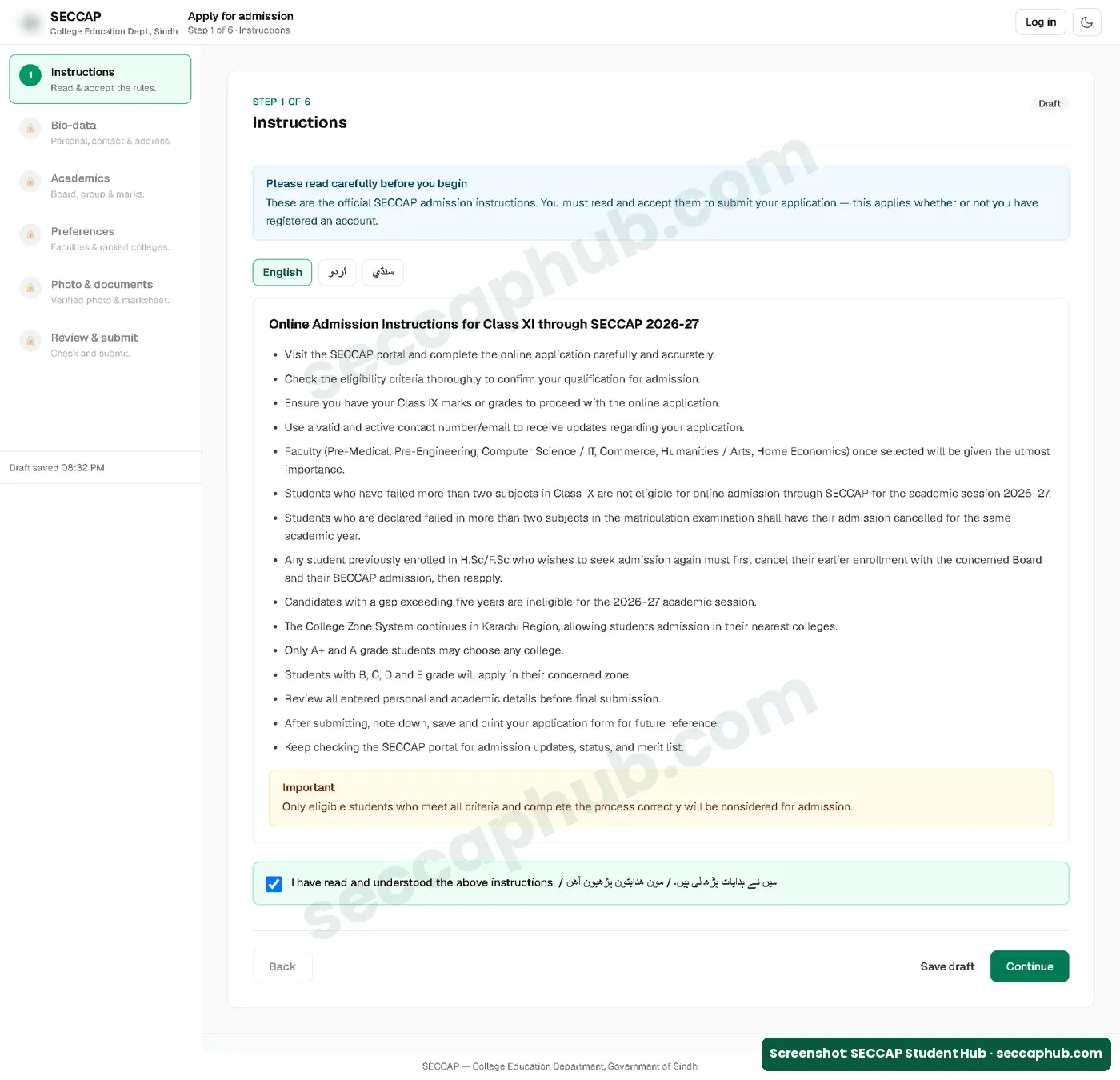
Step 1: Read the instructions
The instructions are in English, Urdu and Sindhi. They repeat the key rules: the zone system in Karachi, the A+ and A rule, and who is not eligible. Read them, tick I have read and understood the above instructions, and press Continue.
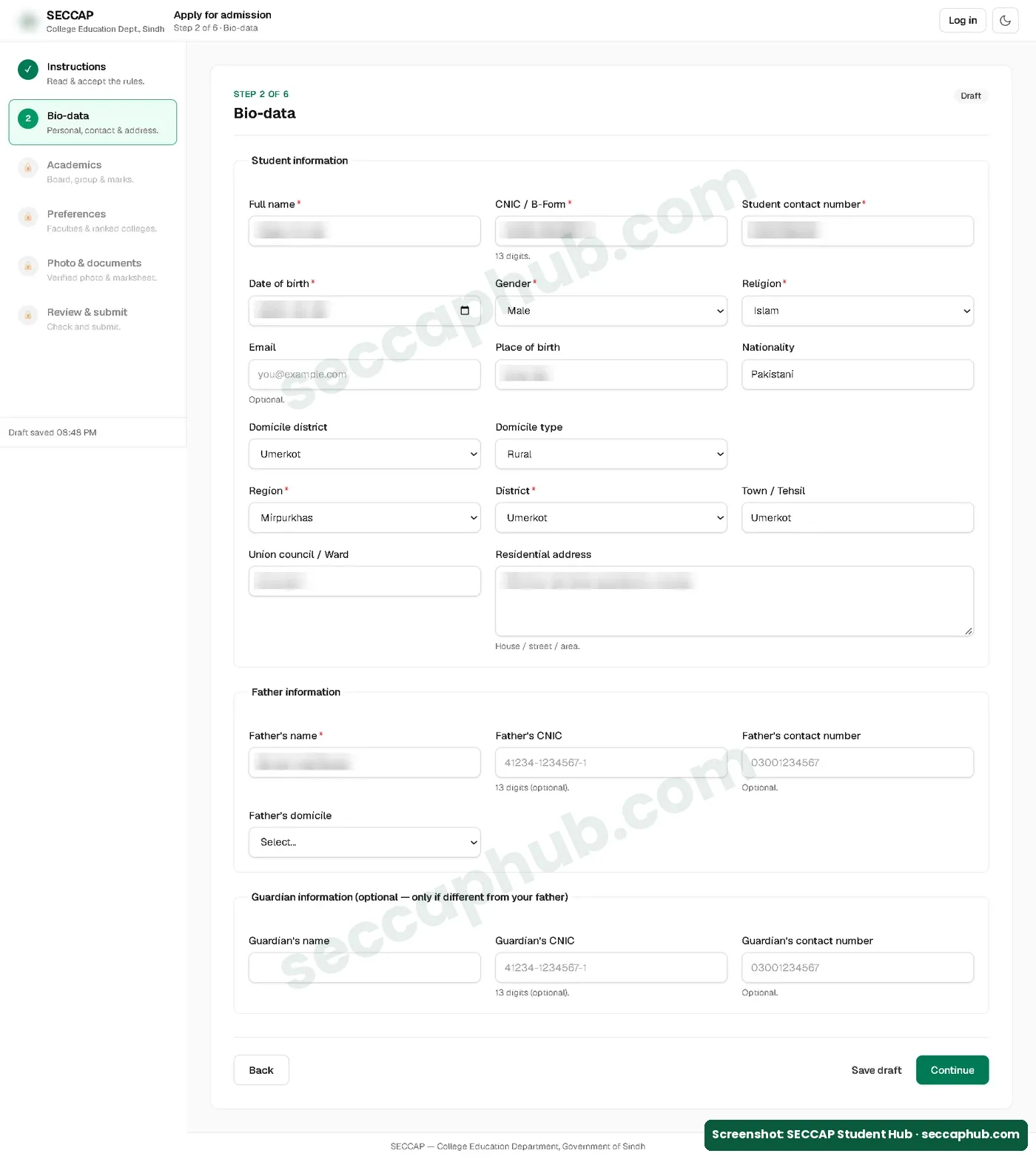
Step 2: Fill your bio-data
Fields marked with a red star are required: full name, CNIC or B-Form, your contact number, date of birth, gender, religion, region, district and your father’s name. Email, your father’s CNIC and phone, and guardian details are optional. Type your name exactly as on your marksheet.
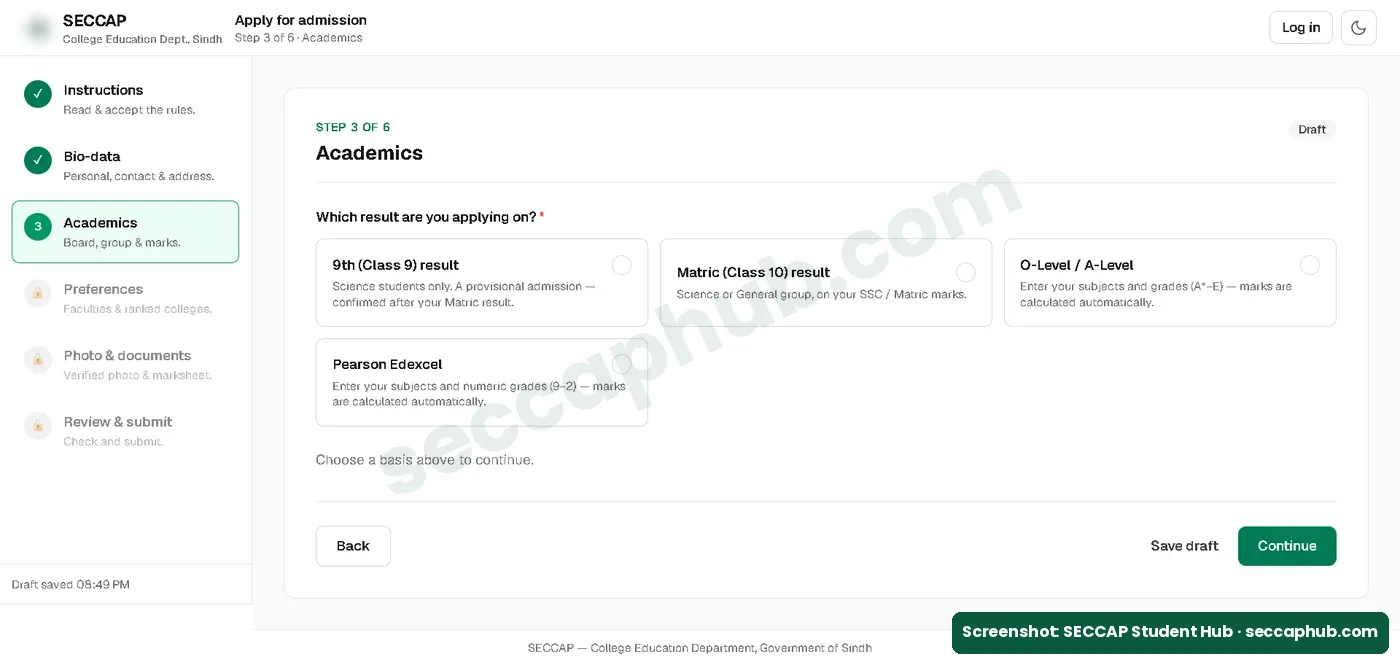
Step 3: Enter your academic result
First choose which result you are applying on:
- 9th (Class 9) result: for Science students only. Your admission is provisional and is confirmed after your Matric result.
- Matric (Class 10) result: Science or General group, on your SSC marks.
- O-Level / A-Level: enter your subjects and grades; marks are calculated automatically.
- Pearson Edexcel: enter your subjects and numeric grades (9 to 2); marks are calculated automatically.
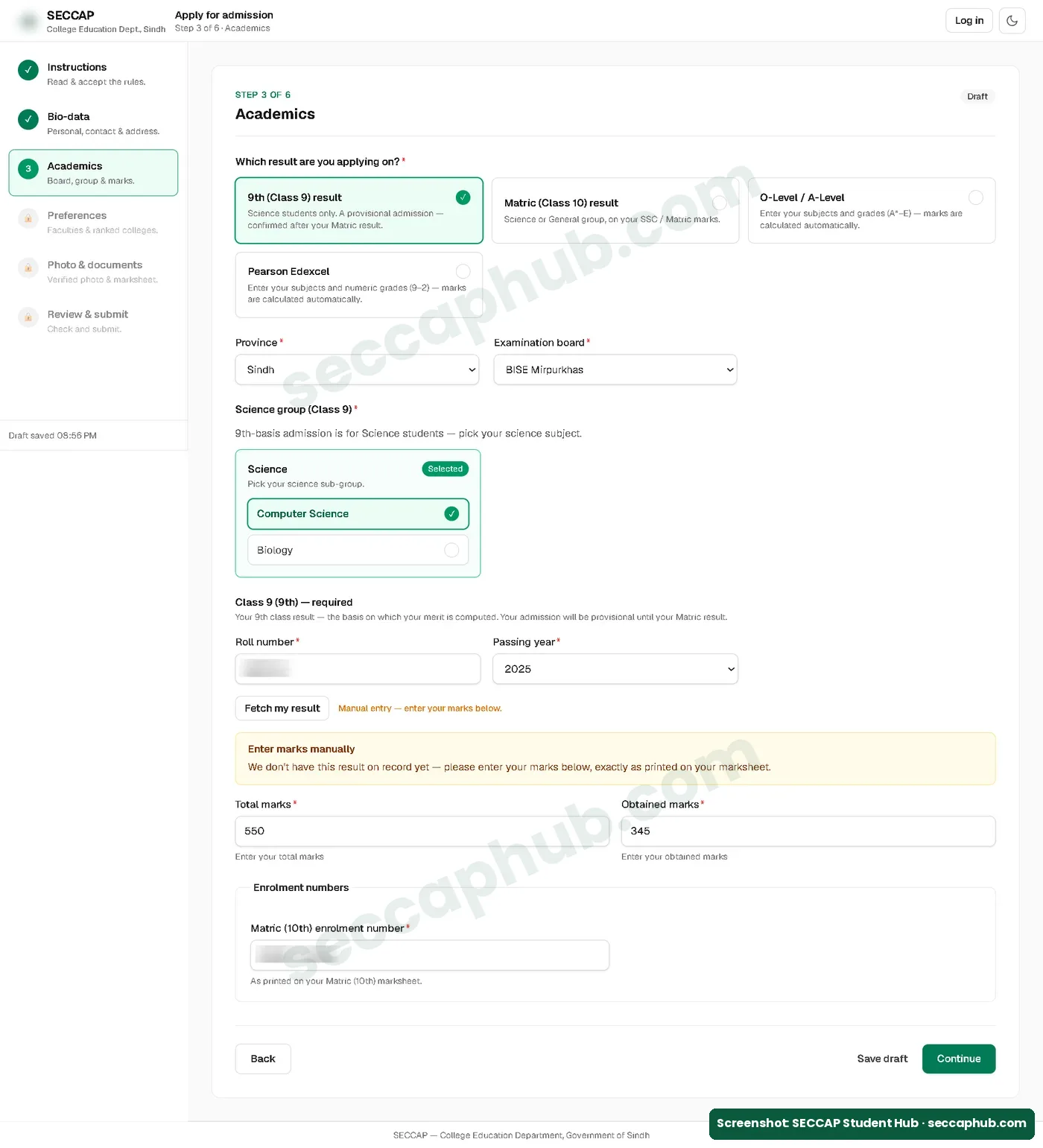
Then choose your province, board and group, and enter your roll number and passing year. Press Fetch my result. If the portal does not have your result on record yet, it asks you to enter your total and obtained marks yourself, exactly as printed on your marksheet. Last, enter your Matric (10th) enrolment number.
Step 4: Choose your faculty and five colleges
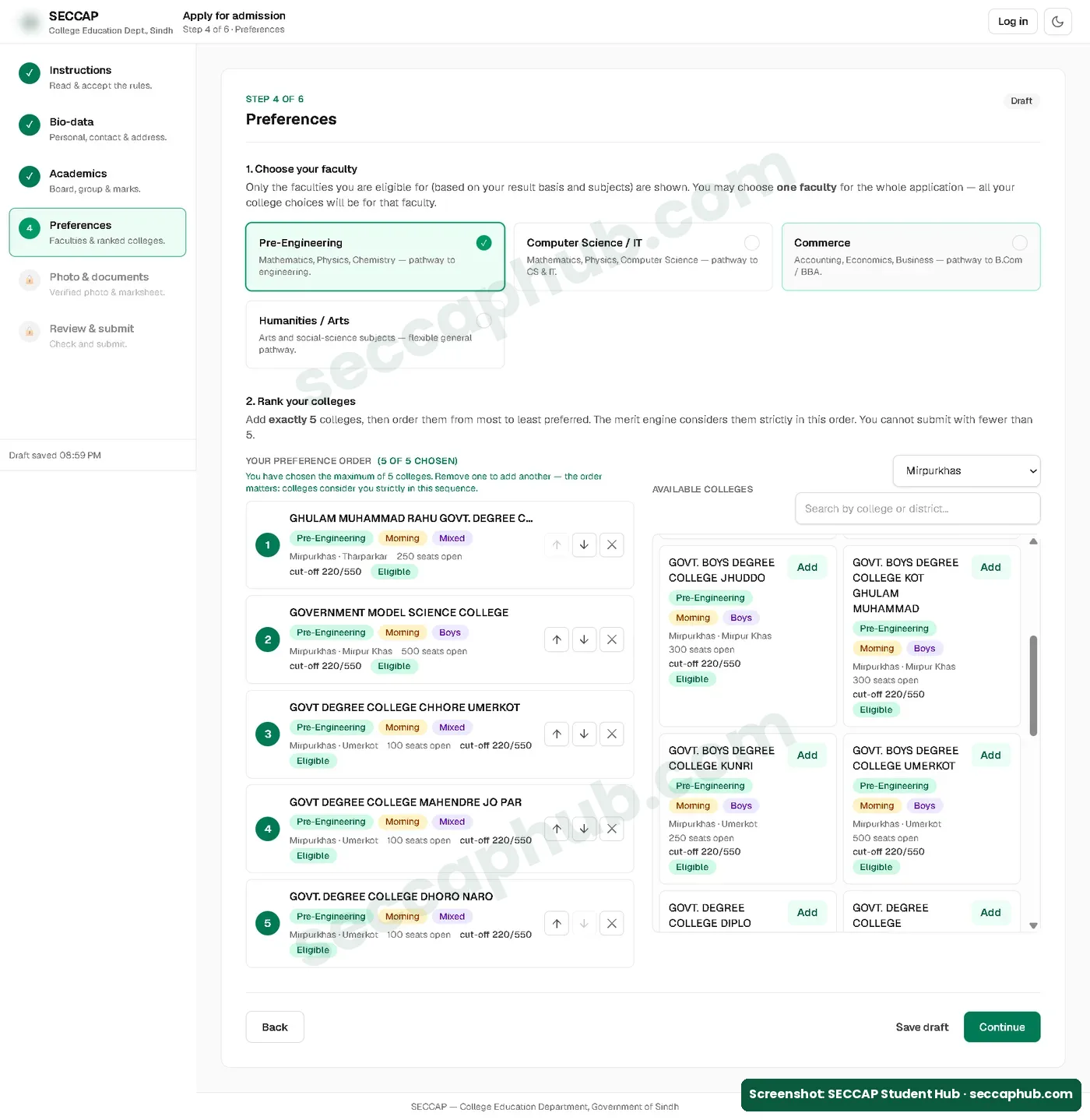
The form shows only the faculties you are eligible for, based on your result and subjects. For example, a Computer Science student does not see Pre-Medical. You choose one faculty for the whole application, and all five colleges are for that faculty.
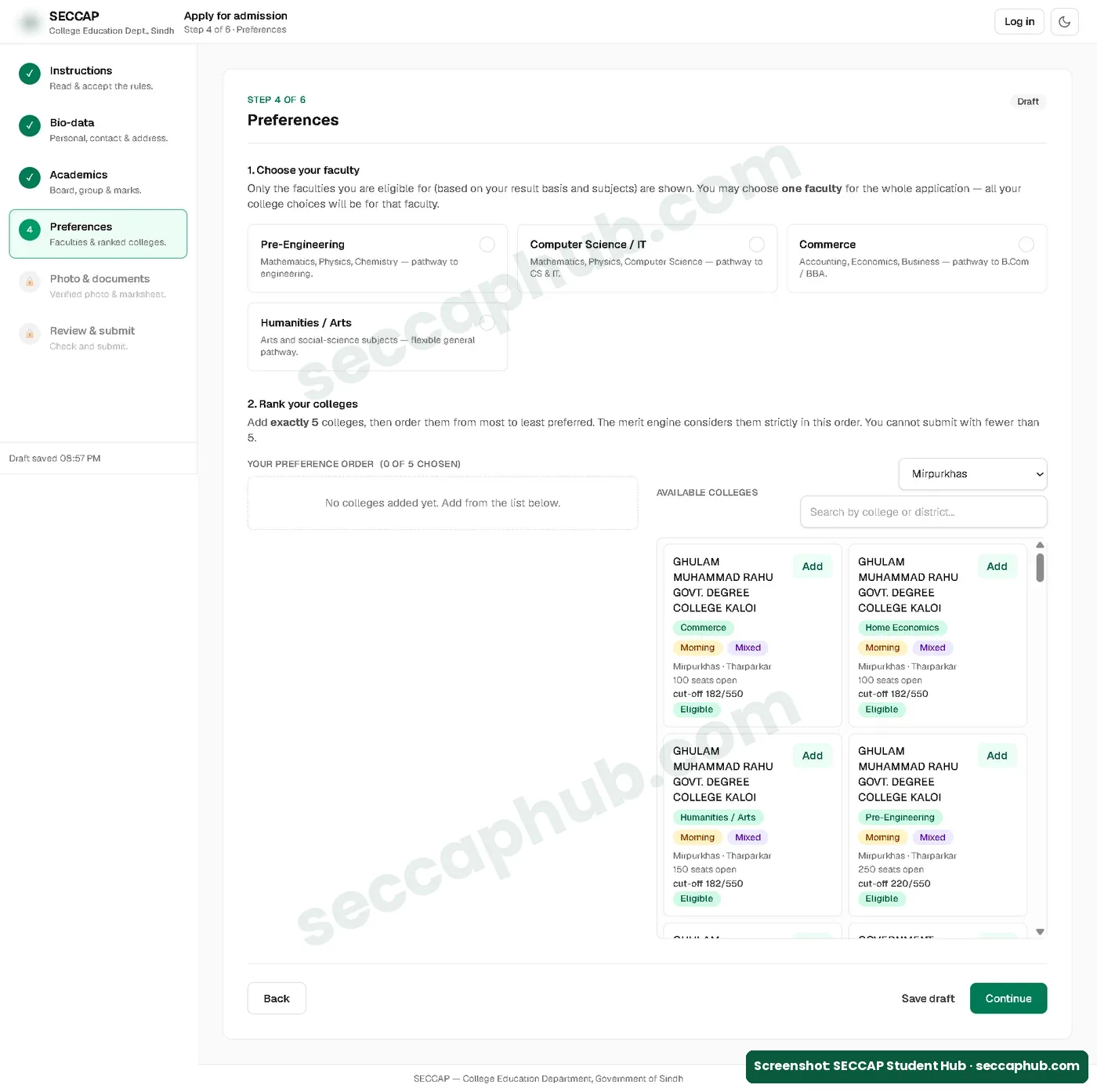
Then add exactly five colleges. You cannot submit with fewer. Use the region filter and the search box to find colleges. Each college card shows its shift (morning or evening), whether it is for boys, girls or mixed, the seats open, the cut-off out of 550, and an Eligible label. Use the arrows to put your first choice at the top. The form says the merit engine considers your colleges strictly in this order.
Step 5: Add your photo and documents
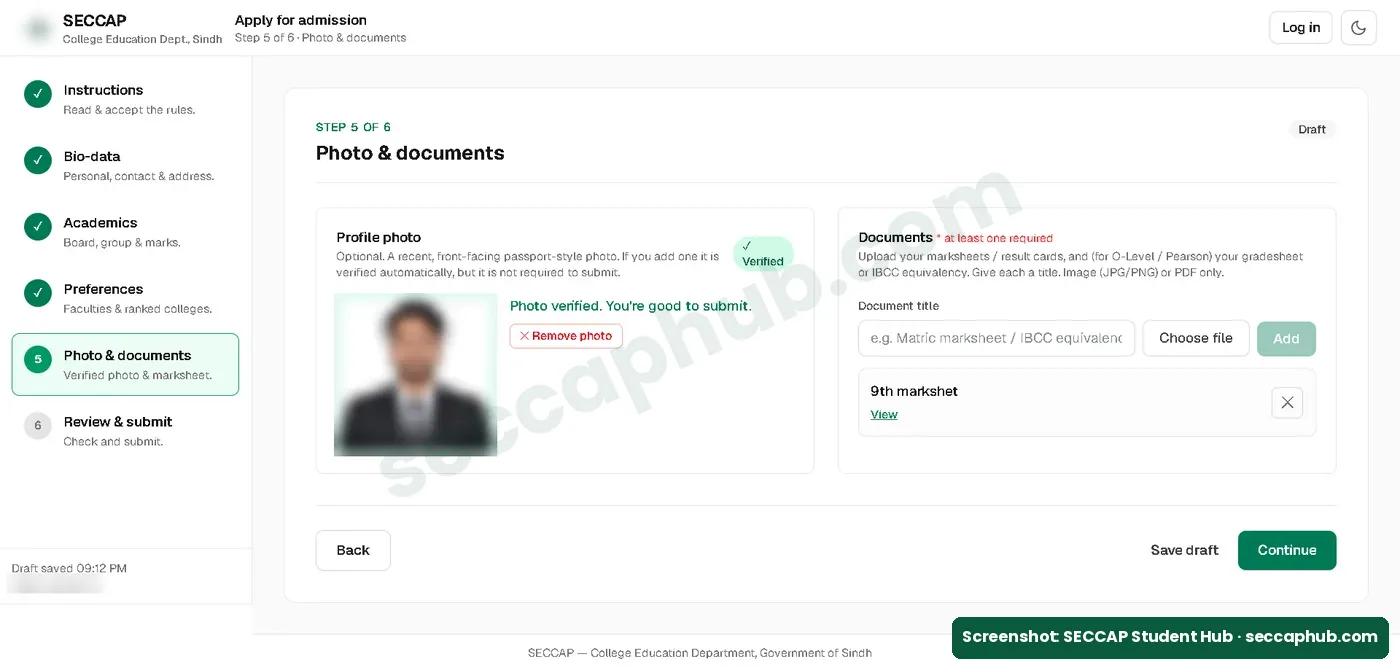
The profile photo is optional at this step and is verified automatically. At least one document is required: type a title (for example, 9th marksheet), choose the file (JPG, PNG or PDF) and press Add. The Continue button stays off until one document is added.
Step 6: Review and submit
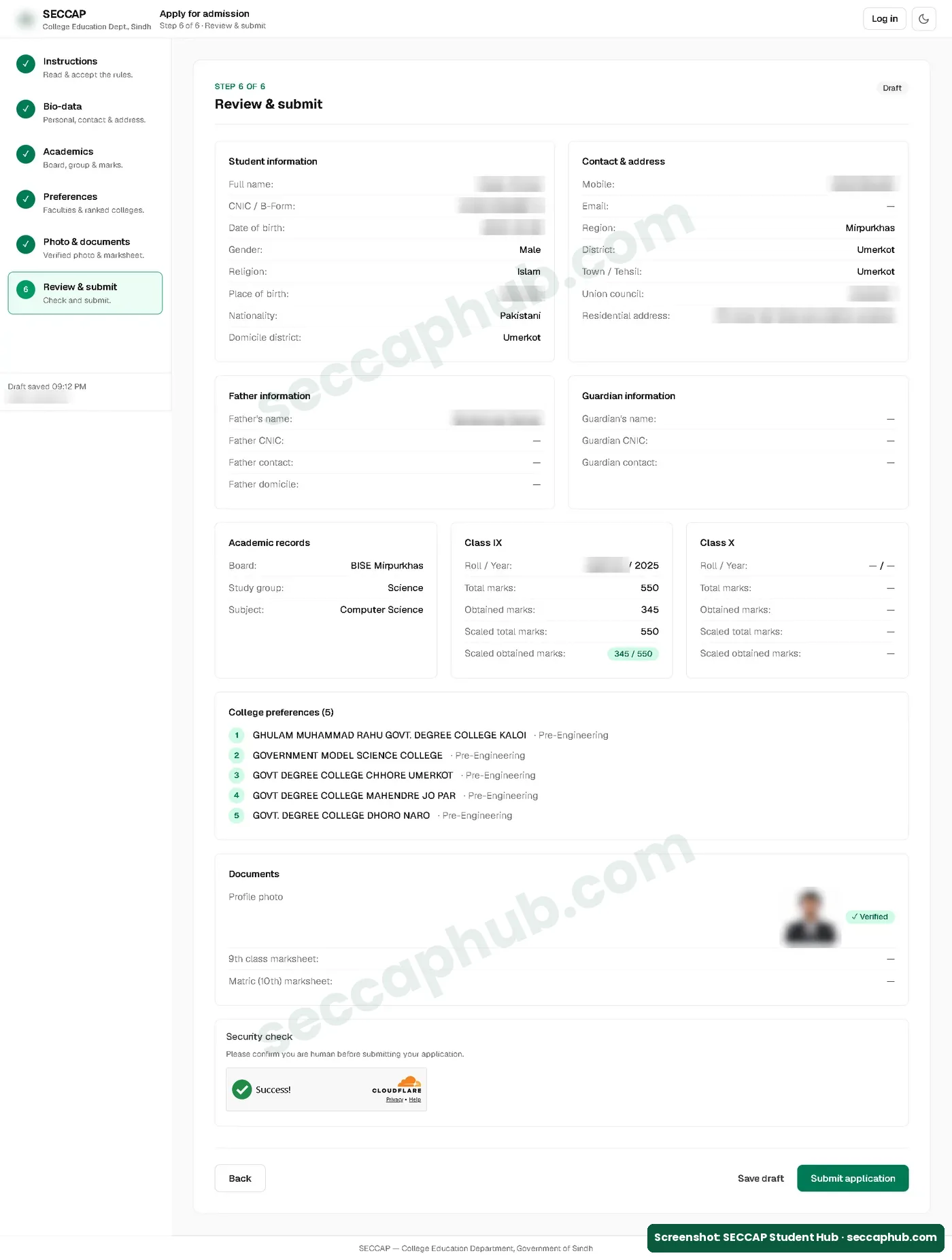
Check every detail on the review page: your name, CNIC, marks and the order of your five colleges. Complete the security check and press Submit application. The portal allows only one application per admission cycle, so check carefully before you submit.
After you submit: save your tracking number and password
The next screen shows three things: your tracking number, your application number (it starts with SEC-2026) and your login details. Your username is your CNIC number. The password is made by the system.
Save your password right away
The portal shows your password only once, on this screen. It is not sent by SMS or email. Write it down or take a screenshot before you leave the page, and never share it with anyone.
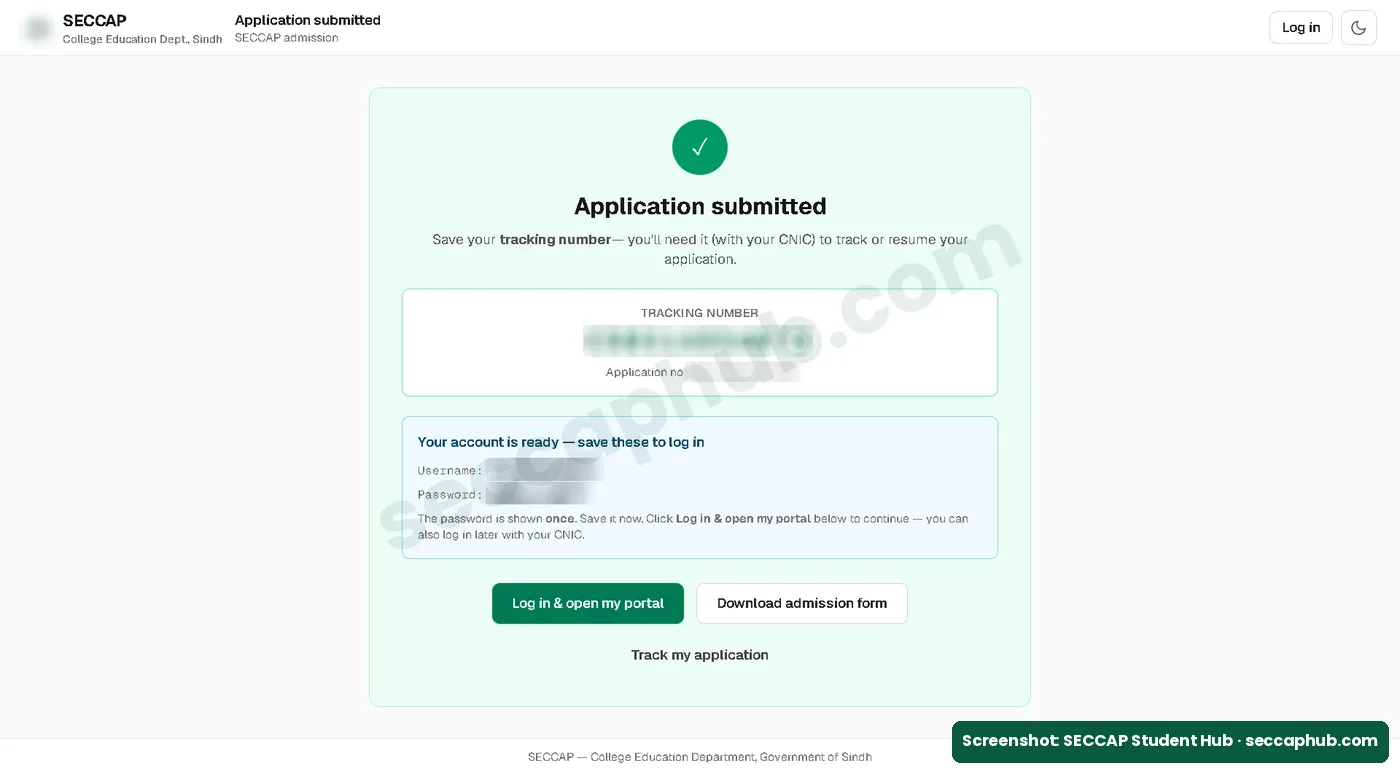
From here you can press Log in & open my portal, Download admission form or Track my application. If you open the Apply page again later, the portal tells you that you have already applied and offers Open my portal and Check status. See our SECCAP login and check status guide.
Missed the window? SECCAP admissions for 2026-27 closed in November 2026. If seats remain, the portal may announce a later phase; we will update our dates page if it does.
How to choose your five colleges
The form needs exactly five colleges. SECCAP places you in the highest college on your list that your merit reaches. Your first choice considers you first; if it fills without selecting you, your application moves to the second choice, and so on down the list.
- Put your dream college first, but not alone. If your merit falls short, your next choices decide where you land.
- Add safer options below it. Each college card in the form shows its cut-off out of 550. Compare it with your own marks, and with the official cut-off marks, before you rank it.
- List only colleges you would join. Think about travel time, morning or evening shift, and whether the college offers your group.
The gap between colleges is large. In the last cycle, Pre-Engineering closed at 490 out of 550 at Adamjee Government Science College but at 230 at Allama Iqbal Government Boys Science College (Morning). A list with only top colleges can leave you with no seat.
Not sure which five to pick? Our step-by-step guide on how to choose your five colleges in SECCAP shows how to use your grade, faculty minimum and last year’s cut-off marks to build a safe list.
SECCAP form download: is there a PDF?
There is no blank SECCAP admission form to download and fill by hand. You fill the form online only. But after you submit, the portal gives you a Download admission form button, and your dashboard has a Download admission form (PDF) button. That PDF is your own filled form.
- Download and print it. When a college is allotted, the portal asks you to take your admission form to the college.
- A “SECCAP form PDF” on another website is not the official form. Do not enter your CNIC on such sites or pay anyone for a form.
- Colleges do not hand out separate admission forms for SECCAP seats. For a government college in Sindh, this online form is the admission form.
What the SECCAP admission form PDF looks like
We downloaded ours from the portal dashboard on 22 October 2026, after our admission was confirmed. It is a single A4 page headed Government of Sindh, College Education Department, Admission Form (SECCAP) 2026-2027, with a QR code and your photo. It shows:
- Your application number, tracking number, submission date and time, the college roll number, and your status (ours: Confirmed · Provisional).
- The college and faculty you were selected for, your personal and father’s details, your board, marks and the five colleges in your order of choice.
- A list of required documents: SSC or ninth marksheet, detail marks or provisional certificate of the last exam passed, character certificate, your own and your father’s or guardian’s B-Form or CNIC, a coloured photograph, and an undertaking by your parent or guardian to ensure 75% attendance.
- Spaces for your signature and the Principal’s signature and stamp, with the line: Please report at the college along with your required documents to confirm your admission.
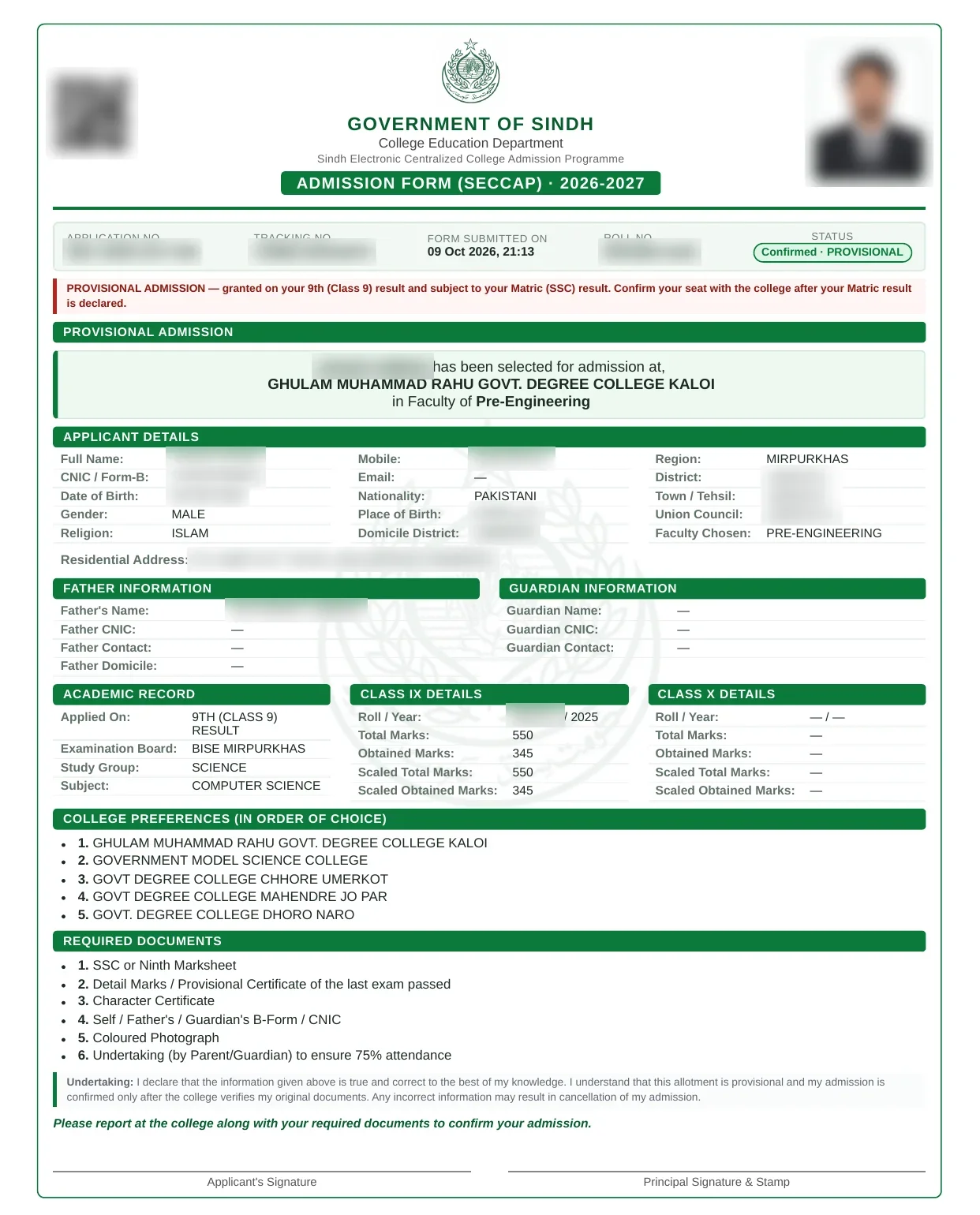
Because we applied on 9th-class marks, our form carries a red note: Provisional admission — granted on your 9th (Class 9) result and subject to your Matric (SSC) result. Confirm your seat with the college after your Matric result is declared. Print the form, sign it, and take it to the college with the documents listed on it.
SECCAP admission form 2026 for colleges in Karachi
Karachi students use the same SECCAP form 2026 as the rest of Sindh. There is no separate Karachi form and no separate BSEK SECCAP admission form. Parents may still call it the CAP form Karachi, but today it is this one online admission form for all Karachi colleges, so SECCAP Karachi admission works exactly like the rest of Sindh. Online college admission in Karachi’s government colleges happens only through seccap.dgcs.gos.pk. So if you are searching for the “1st year admission form” or “online admission 1st year Sindh board”, this SECCAP online form is the one you need, whichever Sindh board you passed Matric from.
- Biggest share of applicants: 98,646 of the more than 160,000 applications for 2026-27 came from Karachi, according to the Director General Colleges, as reported by Bloom Pakistan.
- BSEK students: if you passed Matric from the Board of Secondary Education Karachi, choose BSEK as your board in step 3 and enter your roll number and marks. SECCAP works out your merit from them.
- Competition: well-known science colleges such as Adamjee Government Science College, D.J. Sindh Government Science College and Government College for Men, Nazimabad close at high marks. Use the official list of colleges to find options near you.
- Help in Karachi: the portal lists the Directorate of College Education, Sindh, at Tughlaq House, Sindh Secretariat, Saddar. Call or WhatsApp the help desk first.
What happens after you submit the SECCAP form
Here is what happened after we submitted our application, and what the portal asked us to do:
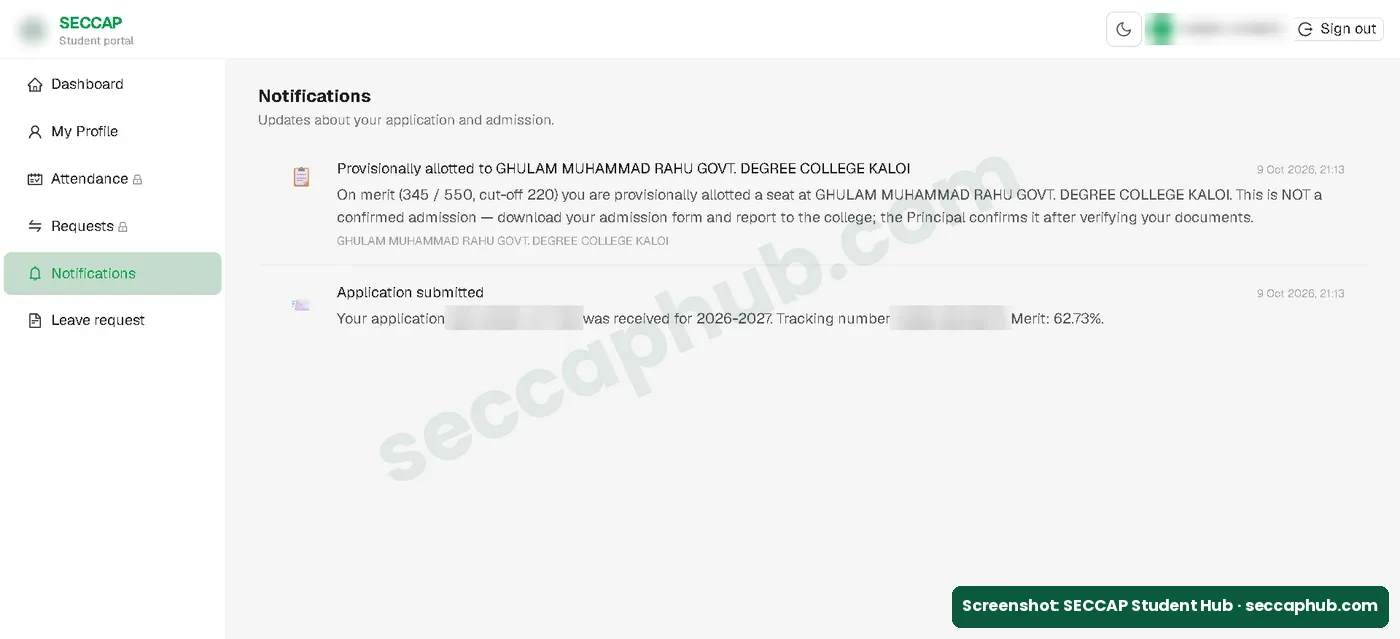
- Allotment: your application goes to your colleges one by one, in your order. In our case, a notification appeared in the portal’s Notifications section within minutes: “Provisionally allotted”, with the merit and the college cut-off. See our SECCAP result and merit list guide.
- Report to the college: the notification said the allotment is not a confirmed admission yet. It asked us to download the admission form and report to the college, where the Principal confirms the admission after verifying documents. The official portal also says to act within 24 hours of an offer, so do this quickly. See our SECCAP claim form guide.
- Documents and fee: take your documents to the college and follow its instructions for the fee. See our SECCAP required documents page.
- After confirmation: the label under your name changes to Admitted and you can download your SECCAP ID card. In our case this happened on 22 October 2026 without a visit to the college. From then on, the portal no longer accepts change requests: for a college or faculty change, contact the College Education Department.
- Board enrollment: once you are in college, you also have to be enrolled with the Board of Intermediate Education Karachi (BIEK) before you can sit the 1st year exams. Your college tells you when to start. See our BIEK enrollment form guide.
Common mistakes on the SECCAP admission form
Most problems come from small typing errors or a weak college list, not from the portal.
| Mistake | What happens | How to avoid it |
|---|---|---|
| Name or marks typed differently from the marksheet | Your record may not match at the college | Copy every detail exactly from the marksheet |
| Leaving the submit screen without saving the password | You cannot log in to your portal | Write down or screenshot the password; it is shown only once |
| Five colleges that all close above your marks | No seat if every choice closes above your merit | Put safer colleges lower in your list |
| Filling the form through an unofficial site or agent | Your data is at risk; no seat is guaranteed | Apply only at seccap.dgcs.gos.pk/apply |
| Waiting too long to apply | Fewer seats left | Apply early in Phase 1; for 2026-27, applications closed in November 2026 |
SECCAP admission form FAQs
Do government degree colleges take 1st year admission through SECCAP?
Yes, for first year (Class XI). Government degree colleges in Sindh that run intermediate classes appear on the official SECCAP List of Colleges, so their 1st year admission, like all government college admission, is done through the SECCAP online form. Degree-level (BS or ADP) admissions in those colleges are separate and not part of SECCAP.
Where do I apply online for government college admission in Sindh?
Only on seccap.dgcs.gos.pk/apply. For government college admission in Sindh you apply for college online once, through SECCAP, and rank five colleges; there is no separate online registration for each college. The SECCAP form is the first year online admission form, the same thing students call the 1st year, 11th class, inter or intermediate admission form. Private colleges have their own forms.
What is the SECCAP admission form?
The SECCAP admission form is the single online application for first year (Class XI) admission in Sindh government colleges. It is run by the College Education Department, Government of Sindh. You enter your details and board marks, choose one faculty and rank exactly five colleges. You fill it online; after submitting you can download your filled form as a PDF.
How do I apply for SECCAP online?
Open seccap.dgcs.gos.pk/apply, read the instructions, fill your bio-data and result, choose one faculty and exactly five colleges, upload at least one marksheet, and submit. No OTP or registration is needed first, though you can register first if you want to set your own password. The form is free.
Is there a fee for the SECCAP form?
No. The official portal says there is no application fee. You pay the college admission fee only after a seat is allotted, through a Sindh Bank challan, as your college instructs. Never pay cash to any person or agent for the form.
What is the last date for the SECCAP admission form 2026-27?
Applications for the 2026-27 session are closed. On 14 November 2026 the official portal homepage said new applications are no longer accepted (on 5 November it had shown 31 December 2026). Applications already submitted continue through the selection rounds. See all dates on our SECCAP admission dates page.
When will the SECCAP admission form 2027 open?
No date has been announced yet. The form for 2027-28 will be on the same official portal. For 2026-27 the window opened on 1 August 2026 and closed in November 2026, so students finishing Matric in 2027 should start checking the official portal from July 2027. We will update this page when the portal announces the new dates.
Can I fill the SECCAP form before my Matric result?
Yes, if you are a Science student. In step 3, choose 9th (Class 9) result. Your admission is provisional: the admission form PDF says to confirm your seat with the college after your Matric result is declared. If you fail more than two subjects in Matric, the admission is cancelled.
What is the SECCAP form number?
You get two numbers. The application number starts with SEC-2026. The tracking number is a 12-character code shown when you save or submit the form. With your CNIC and tracking number you can check your status on the Track Application page without logging in.
Can I edit my SECCAP application or change my faculty (group)?
You choose one faculty in step 4 of the form, and after you submit the filled fields are locked. The portal’s Requests section is meant for faculty or college changes, but once our admission was confirmed it said: you can no longer raise a claim request from the portal. Please contact the College Education Department for any change. So choose your faculty carefully before you submit.
Is the SECCAP form the same as the 1st year (Class 11) admission form?
For government colleges in Sindh, yes: the SECCAP form is the Class 11 admission form. All 1st year admission 2026-27 in these colleges goes through it. Private colleges run their own admissions. Students looking for a college admission form for a Sindh government college need only this online form. Whether you call it intermediate admission, FSc admission, 11th class admission or first year admission, in a Sindh government college it is done through SECCAP.
Is there a separate admission form for Karachi colleges?
No. The admission form for Karachi colleges is the same SECCAP online form used across Sindh. You apply on seccap.dgcs.gos.pk, choose one faculty and rank five colleges; there is no separate form for BSEK students or for any one college.
Can O-Level students fill the SECCAP form?
Yes. In step 3 of the form, choose O-Level / A-Level (or Pearson Edexcel) and enter your grades; marks are calculated automatically. Upload your gradesheet or IBCC equivalence in step 5. The portal also has an O-Level page with more details.
Do I need an OTP or registration to fill the SECCAP form?
No. When I filled the form on 9 October 2026, it did not ask for any OTP or a separate registration. The portal created our account when we submitted: the username is your CNIC and the password is shown once on the screen. Registering first on the portal’s Register page is optional; if you do, you set your own password.
I did not save my SECCAP password. What now?
You can still check your status without logging in: open the Track Application page and enter your CNIC and tracking number. For help with the password, contact the official help desk on 0345-2132045.
اردو میں خلاصہ
- سیکیپ فارم سندھ کے سرکاری کالجوں میں فرسٹ ایئر (کلاس الیون) داخلے کا واحد آن لائن فارم ہے۔ اس کی کوئی فیس نہیں۔
- فارم صرف seccap.dgcs.gos.pk/apply پر بھریں۔ پہلے سے رجسٹریشن یا او ٹی پی کی ضرورت نہیں۔
- ایک فیکلٹی چنیں اور پورے پانچ کالج ترجیح کے مطابق لگائیں، پانچ سے کم پر فارم جمع نہیں ہوتا۔
- کم از کم ایک دستاویز (مارک شیٹ) اپ لوڈ کرنا ضروری ہے، تصویر جمع کرواتے وقت اختیاری ہے۔
- فارم جمع ہونے پر ٹریکنگ نمبر، یوزر نیم (آپ کا شناختی کارڈ نمبر) اور پاس ورڈ ملتا ہے۔ پاس ورڈ صرف ایک بار دکھایا جاتا ہے، فوراً محفوظ کر لیں۔
- سیشن 2026-27 کے لیے درخواستیں بند ہو چکی ہیں۔ 14 نومبر 2026 کو سرکاری پورٹل نے بتایا کہ نئی درخواستیں قبول نہیں کی جا رہیں۔
Sources and how we checked this guide
Every fact on this page comes from the official SECCAP portal, my own application on it, or a named news report. I filled the form myself on the official portal on 9 October 2026 and last checked the portal on 12 October 2026.
- Official SECCAP portal homepage: groups and minimum marks, no application fee, help desk, and the last date, extended from 31 October to 3 November and then to 31 December 2026 (checked 5 November 2026); on 14 November 2026 it said applications are closed.
- Our own application on the official Apply page, 9 October 2026: every step, field and screen shown on this page (screenshots with personal details blurred).
- Apply page and O-Level page: where the SECCAP form is filled.
- Required Documents: document list, quotas and the Sindh Bank challan.
- Official FAQs: accepted boards, applying with 9th-class marks, change and cancellation requests.
- Result page: what the result asks for and shows.
- Application figures: Bloom Pakistan and TechJuice, citing the Director General Colleges, Sindh.
- Official Cut Off page: last-cycle cut-off marks.
- Official Eligibility page: year of passing, domicile, who is not eligible.
This is an independent guide, not the official SECCAP website. If the portal says something different from this page, follow the portal and tell us so we can correct it.