

The SECCAP claim form is the step where you accept the government college you have been offered for first year (Class XI) and complete your admission. Many students call it the college claim form, but there is no separate form to download. This guide explains what claiming means in 2026-27, what the portal actually asked us to do when we got a seat, and how to ask for a change or cancel.
Quick answer: SECCAP claim form 2026 in 5 points
- What it means: to claim is to accept the seat you were allotted and complete your admission. The portal also uses “claim request” for asking a college or faculty change (see below).
- How you hear about it: a Provisionally allotted message in your portal’s Notifications, and the status Allotted — not confirmed yet.
- What to do: download your admission form and report to the allotted college. The Principal confirms your admission after checking your documents.
- Time limit: the official portal says to confirm or change your allotted college within 24 hours, so act the same day.
- Want a different college? Once your admission is confirmed, the portal no longer accepts claim requests and asks you to contact the College Education Department.
Track your applicationOpens seccap.dgcs.gos.pk/track on the official portal
Starts when a seat is offered to you
- Claim your seat: download your admission form and report to the college quickly.
- Need a different college? After your admission is confirmed, contact the College Education Department.
- Do nothing and the offer may lapse to the next candidate.
SECCAP claim form 2026-27 at a glance
| Question | Answer |
|---|---|
| Where do I see my seat? | Notifications in your portal, or the official Track Application page with your CNIC and tracking number |
| What does the portal ask? | Download the admission form and report to the college |
| Who confirms the admission? | The college Principal, after verifying your documents |
| How quickly? | The official portal says within 24 hours of an offer |
| Is there a claim form PDF? | No separate claim form. You take your downloaded admission form (PDF) to the college |
| Change or cancel | After admission is confirmed, the portal says to contact the College Education Department |
| Help | 0345-2132045, Monday to Saturday, 9 am to 5 pm |
What does claim mean in SECCAP?
In SECCAP, a seat on the merit list is an offer. Claiming means accepting that offer and completing your admission at the college. The official portal says students must confirm or change their allotted college within 24 hours.
When I filled the form on 9 October 2026, my offer arrived in the portal’s Notifications within minutes. It said: the seat is provisionally allotted, it is not a confirmed admission, and I should download the admission form and report to the college, where the Principal confirms the admission after verifying documents.
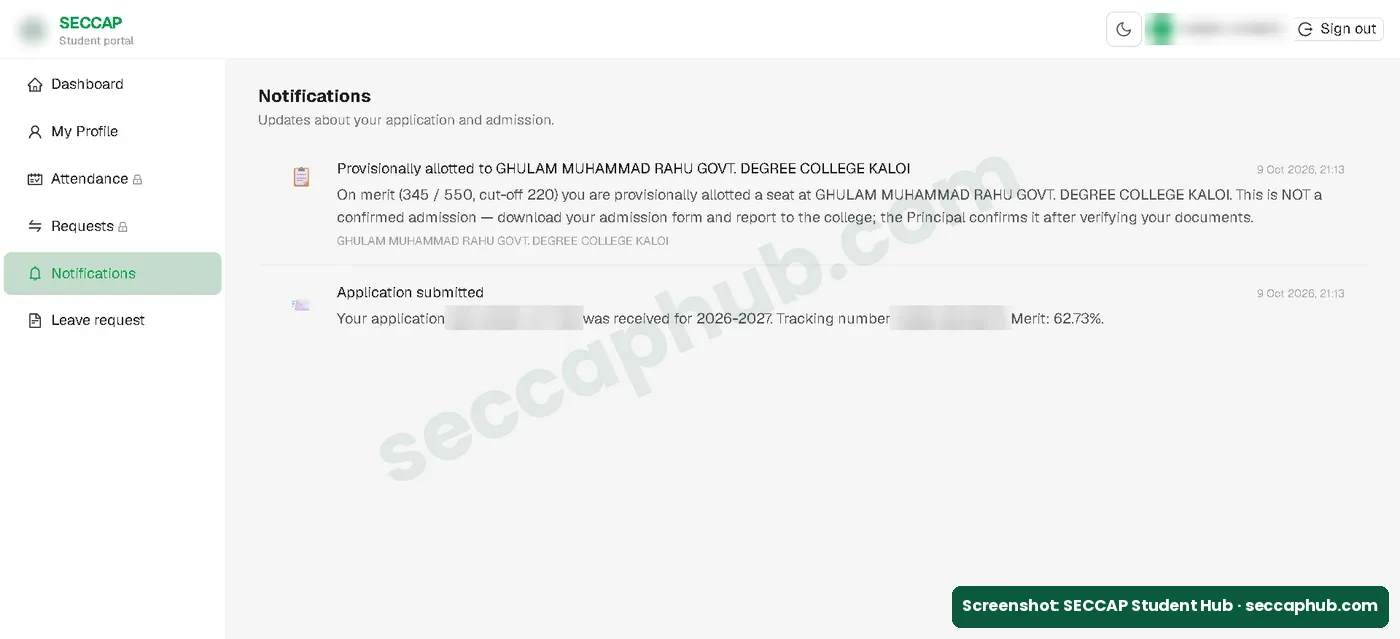
The portal uses the word “claim” in two places. On Track Application, claiming a seat means accepting it. Inside the student portal, the Requests section (its address ends in tab=claims) is where a claim request for a college change, a faculty change or a cancellation is raised. So a claim is not a general complaint, but it can be a request to change your seat. That second kind is explained below.
How to claim your college on SECCAP
- Check your offer. Log in and open Notifications, or use the official Track Application page with your CNIC and tracking number. The status shows Allotted — not confirmed yet with your college, faculty and college code.
- Download your admission form. Use Download / print admission form on the Track page, or Download admission form (PDF) on your dashboard. Print it.
- Report to the college quickly. Take the printed form and your documents (see our documents checklist). Do not wait: the portal’s own guidance is 24 hours.
- Follow the college’s instructions for verification and the admission fee. The Principal confirms your admission.
- Check your portal. When your admission is confirmed, the label under your name changes to Admitted and you can download your SECCAP ID card. In our case this happened on 22 October 2026 without a visit to the college, so some students may see it before they report. But the admission form PDF downloaded that same day still said Please report at the college along with your required documents to confirm your admission, and that the college verifies your original documents. So report to the college anyway.
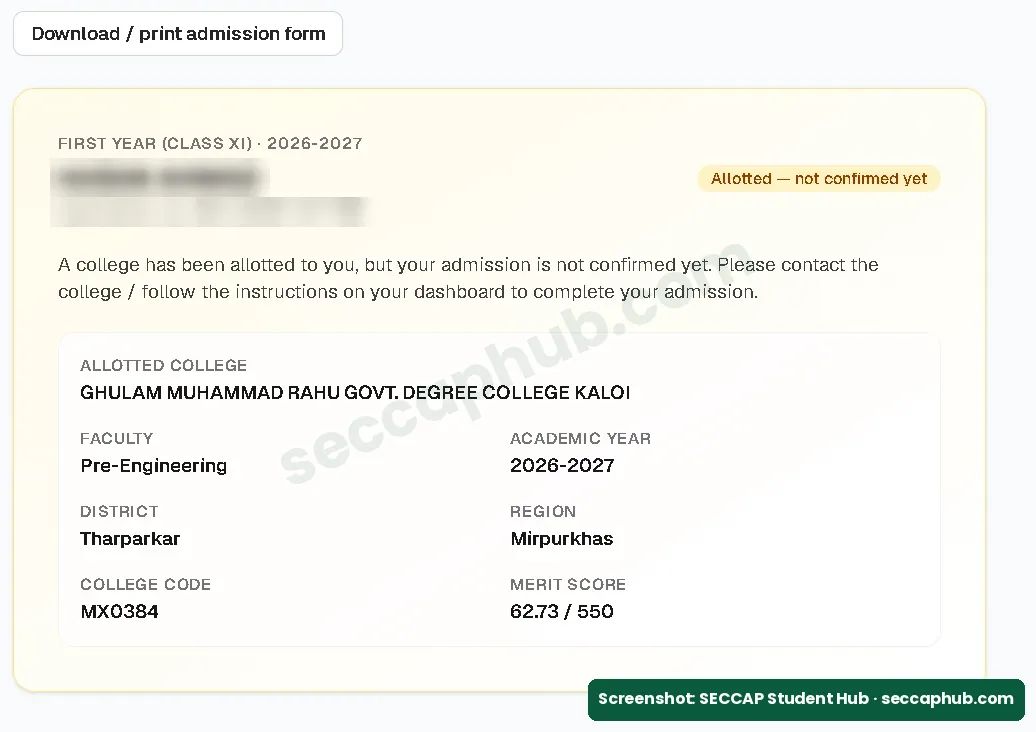
If the portal shows a claim or confirm button for you, follow it as well. The official Track page says it can be used to claim a seat. In our case, the instruction was to report to the college.
Claim, change or cancel: which one do you need?
| You want to | What to do | Who decides |
|---|---|---|
| Keep the college you were allotted | Download the admission form and report to the college quickly | The college Principal confirms |
| Move to a different college or faculty | After admission is confirmed, contact the College Education Department; the portal no longer accepts claim requests | The College Education Department (the official FAQs name the Secretary’s office) |
| Leave SECCAP admission | Contact the College Education Department and inform your college office | The College Education Department |
How to request a different college
The student portal has a Requests section: Raise a college change, a faculty change, or cancel your admission. Only one request of each type can be pending at a time. It shows your current college and faculty and a New request button. In our portal the button was locked while the seat was only allotted.
On 22 October 2026, after our status changed to Admitted, the same section showed: Admission confirmed. Your admission is already confirmed, so you can no longer raise a claim request from the portal. Please contact the College Education Department for any change. So in our case there was no point at which a change could be requested from the portal. If you need a change after admission, contact the College Education Department directly.
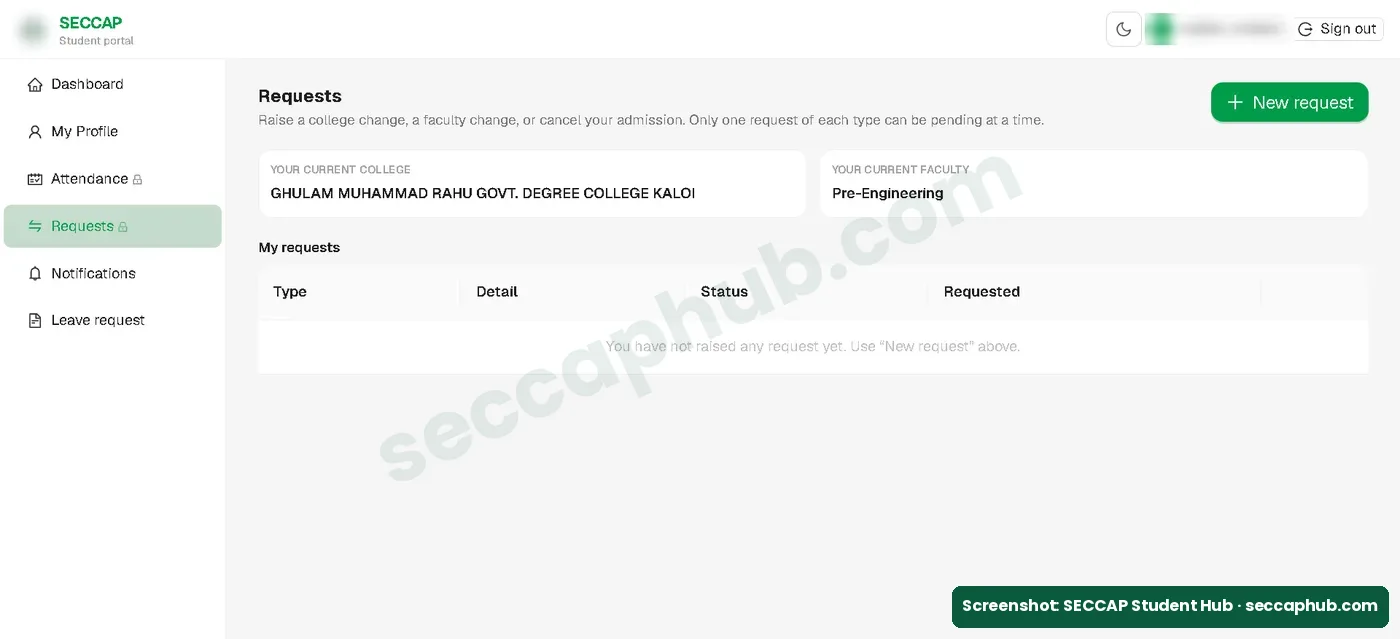
The official FAQs say the Secretary’s office reviews and decides every request, so a change is not automatic. Until you know the decision, keep the seat you have. Remember that the merit system already places you in the highest college on your list that your merit reaches; a change request is for special cases.
How to cancel your SECCAP admission
The Requests section is meant for cancellation too, but once your admission is confirmed the portal says you can no longer raise a claim request there and asks you to contact the College Education Department. If you have already joined a college, inform the college office as well. The form instructions also say that a student already enrolled in first year who wants to apply again must first cancel the earlier enrollment with the board and the SECCAP admission.
Is there a SECCAP claim form PDF?
There is no separate college claim form to download. The PDF you need is your own admission form, which you download from the portal after you apply and take to the college. A “SECCAP claim form PDF” on another website is not part of the official process, so do not enter your CNIC or pay anyone there.
Some websites show their own “claim form” that asks for your CNIC and documents. Those are not the official portal. Claim only through seccap.dgcs.gos.pk.
Common SECCAP claim mistakes
| Mistake | What happens | How to avoid it |
|---|---|---|
| Waiting days before reporting to the college | The offer may pass to the next student | Check Notifications daily and act the same day |
| Thinking “allotted” means admitted | Admission is not confirmed until the college verifies your documents | Report to the college with your admission form |
| Treating claim as a complaint | You may not secure your seat in time | Secure the seat first; ask for a change separately |
| Sharing your password with an agent or cafe | Someone else controls your account | Log in yourself and never share your password |
| Using a look-alike website | Nothing is recorded | Use only seccap.dgcs.gos.pk |
If you missed the 24 hours
- Contact the help desk at once: WhatsApp or call 0345-2132045, Monday to Saturday, 9 am to 5 pm. See our help desk page.
- Check your status on Track Application or in your portal.
- If all your choices finish without a seat, the official dates page says your case goes to the College Education Department, which may adjust you. See our SECCAP dates page.
SECCAP claim form FAQs
Is there a SECCAP transfer form to change college?
Not on the portal for most students. The portal’s Requests section is where faculty or college change requests are raised, but once our admission was confirmed it said we could no longer raise a request from the portal and should contact the College Education Department for any change. A “SECCAP transfer form” offered on another website is not official, so ask your college office or the SECCAP help desk first.
What is the SECCAP claim form?
It is the step where you accept the college allotted to you and complete your admission. In practice you download your admission form from the portal and report to the college, where the Principal confirms your admission after checking documents.
How do I claim my college on SECCAP?
Check your offer in Notifications or on Track Application, download and print your admission form, and report to the allotted college with your documents as quickly as you can.
How long do I have to claim my SECCAP seat?
The official portal says to confirm or change your allotted college within 24 hours. Act the same day you see the offer.
Does “Allotted — not confirmed yet” mean I am admitted?
Not yet. It means a college has offered you a seat. Your admission is confirmed only after you report to the college and the Principal verifies your documents.
Where do I get the college claim form?
You do not need one. The college asks for your SECCAP admission form, which you download from Track Application or your dashboard after a seat is allotted. Print it and take it to the college with your documents.
Is claim the same as a complaint or review?
Not a general complaint. Claiming a seat means accepting it. The portal also calls a request for a college change, faculty change or cancellation a “claim request”, raised from the Requests section. Once your admission is confirmed, the portal no longer accepts claim requests and asks you to contact the College Education Department.
Can I change my college after claiming?
Not from the portal once your admission is confirmed. On 22 October 2026 our portal said: Your admission is already confirmed, so you can no longer raise a claim request from the portal. Please contact the College Education Department for any change. A change is not automatic.
How do I cancel my SECCAP admission?
Once your admission is confirmed, contact the College Education Department, because the portal no longer accepts claim requests. Inform your college office too.
اردو میں خلاصہ
- سیکیپ میں کلیم کا مطلب ہے الاٹ ہونے والی سیٹ قبول کرنا اور داخلہ مکمل کرنا، یہ شکایت یا ریویو نہیں۔
- سیٹ ملنے کی اطلاع پورٹل کے نوٹیفکیشن میں آتی ہے: Provisionally allotted یعنی ابھی داخلہ کنفرم نہیں۔
- الگ سے کوئی کالج کلیم فارم نہیں۔ پورٹل سے ایڈمیشن فارم ڈاؤن لوڈ کر کے کالج جائیں، پرنسپل کاغذات دیکھ کر داخلہ کنفرم کرتے ہیں۔
- سرکاری پورٹل کے مطابق 24 گھنٹے کے اندر قدم اٹھائیں۔
- داخلہ کنفرم ہونے کے بعد پورٹل سے کالج یا فیکلٹی بدلنے یا داخلہ کینسل کرنے کی درخواست (کلیم ریکوئسٹ) نہیں دی جا سکتی، اس کے لیے کالج ایجوکیشن ڈیپارٹمنٹ سے رابطہ کریں۔
Sources and how we checked this guide
I filled the SECCAP form myself on the official portal on 9 October 2026 and recorded what happened after a seat was allotted. I last checked the portal on 12 October 2026.
- Our own application, 9 October 2026: the allotment notification, Track Application result and Requests section (screenshots with personal details blurred). Checked again on 22 October 2026, after our admission was confirmed.
- Official portal announcements: confirm or change your allotted college within 24 hours.
- Official FAQs: change and cancellation requests, decided by the Secretary’s office.
- Official Important Dates page: what happens when all choices finish without a seat.
This is an independent guide, not the official SECCAP website. If the portal says something different from this page, follow the portal and tell us so we can correct it.